· by max
how to tune your kick to the key of your track
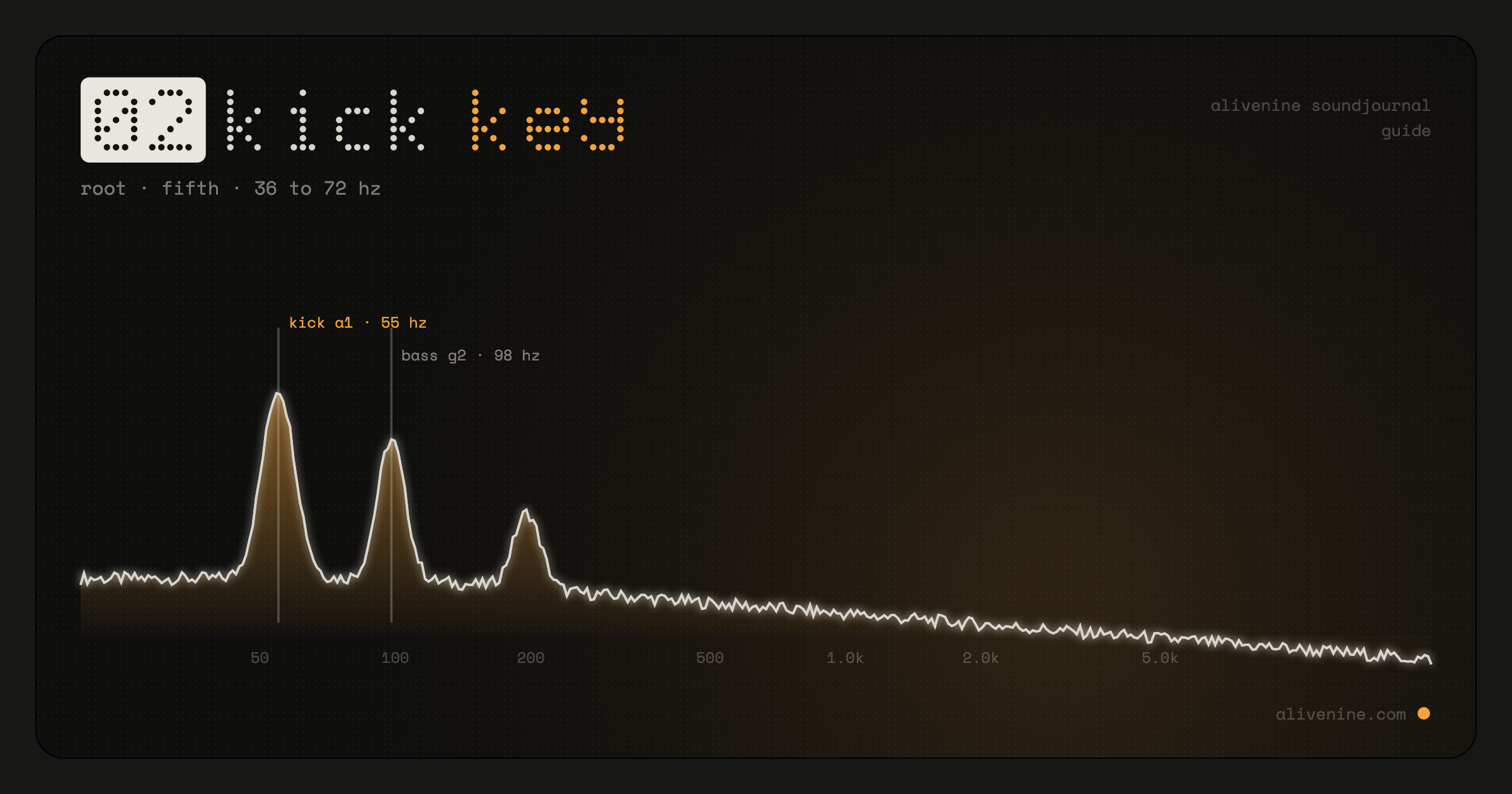
Every kick with a body has a note. Most of the time nobody chooses it. The sample was tuned to whatever its maker liked, and the bassline comes later. When the two land on neighbouring notes, the low end starts to wobble and no EQ really fixes it. The note can be measured and chosen, with any kick. alivedrum chooses it by itself, more on that below.
- the pitch of a kick is the note of its tail, not of the click at the start.
- most kicks live between about 40 and 80 hz. that is the same range as the root notes of the bass.
- tune the kick to the root or the fifth of your key. those two clash least with the rest of the song.
- two low notes less than a semitone apart beat against each other. that beating is what makes kick and bass feel muddy.
- if the bass moves a lot, a kick that stays a safe distance from the current bass note works better than one fixed note.
why a kick has a pitch
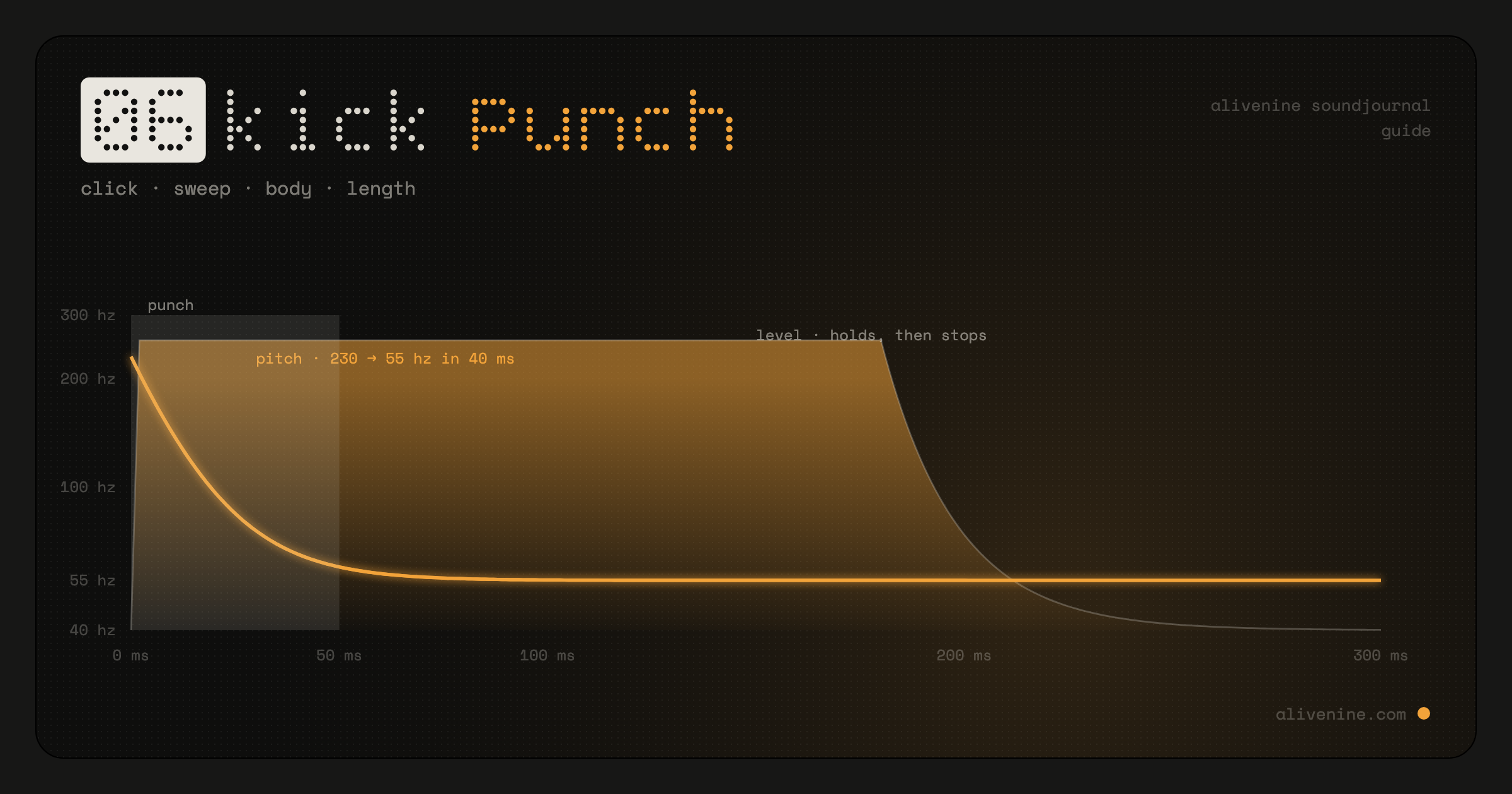
A synthesized kick is mostly a sine wave that starts high and falls fast. In the first 20 to 60 ms it sweeps down from a few hundred Hz, and that sweep is what you hear as the punch. Then it settles on one frequency and rings out. That ringing part is the body, and it has a pitch like any other note.
The longer the body rings, the clearer the note. A tight house kick with 150 ms of body only hints at a pitch. A long 808 style kick with a second of decay is basically a bass note with a click on top. The click itself, the short noise or tick at the start, has no clear pitch and doesn't need tuning.
The body sits where the bass sits. Kicks usually land between 40 and 80 Hz, and so do the lowest notes of almost every bassline. That overlap is the whole reason tuning matters.
find the key of your track
If you wrote the song, you probably know the key. If you don't, look at the bassline. The note it returns to most often, and especially the note it lands on at the start of a section, is almost always the root.
Play that note on a synth over the track and hold it. If it sounds like home, that's your root. If it sounds like it wants to go somewhere, try the note seven semitones lower. Your first note may have been the fifth.
measure the note of your kick
You need a tuner or a spectrum that shows notes. Ableton Live has a tuner device, Logic Pro has a tuner plugin, and many spectrum analyzers show the note and the cents under the cursor. alivemeter, our free meter, does that in its spectrum: hover over the peak and it shows the frequency, the note and how many cents off it is.
The trick is to measure the tail, not the attack. A tuner reading the first 50 ms sees the sweep and jumps around. Loop the kick, or a single hit with a long decay, and watch the reading settle after the click. On a spectrum, the tallest peak in the low end once the sweep is over is the note.
If you prefer your ears: solo the kick, play a sine bass note under it, and move the note until the two stop beating against each other. When they lock, you've found it.
| Note | Frequency | Note | Frequency |
|---|---|---|---|
| E1 | 41.2 Hz | A#1 | 58.3 Hz |
| F1 | 43.7 Hz | B1 | 61.7 Hz |
| F#1 | 46.2 Hz | C2 | 65.4 Hz |
| G1 | 49.0 Hz | C#2 | 69.3 Hz |
| G#1 | 51.9 Hz | D2 | 73.4 Hz |
| A1 | 55.0 Hz | D#2 | 77.8 Hz |
The table uses scientific pitch notation with A4 at 440 Hz, the same as the list of piano key frequencies on Wikipedia. Ableton names its octaves one lower, so A1 in this table is A0 in a MIDI clip. The frequency is what counts.
which note to pick
The safe choice is the root of the key. A kick on the root sits under every chord that contains it, and in most songs that's most of them.
The fifth is the second safe choice. It is inside the root chord and inside the chord on the fifth, so it rarely sounds wrong. It also helps when the root is awkwardly placed. If your key is D, the root D2 sits at 73.4 Hz, which is high for a kick. The fifth of D is A. A1 at 55 Hz sits below the root and gives a deeper and rounder body.
A rough guide by range:
- 45 to 55 Hz: deep and round, felt more than heard. Good for slower tracks and big systems.
- 55 to 65 Hz: the middle. Still deep, and it starts to show on smaller speakers.
- 65 to 80 Hz: punchier and more audible on laptops, but closer to the low mids where the bass wants to be.
Avoid the notes a semitone or two next to the root, and the third of the key. The third clashes under every chord that doesn't contain it.
tuning a sample or a synth kick
a sample
Load the kick into a sampler and use its transpose or tune control. Measure first, then move it by the difference. If the kick sits at 52 Hz, close to G#1, and your key is A minor, transpose it up one semitone to 55 Hz.
Large transpositions change the character. Pitching a sample up 5 semitones also shortens it and makes the click thinner. If you need more than 3 or 4 semitones, look for another sample that's closer to begin with. Some samplers can repitch without changing length, but a kick usually sounds better when it just plays faster or slower.
a synth kick
Synth kicks are easier. Most drum synths have a tune knob for the body. Switch off keyboard tracking if the synth has it, so that every trigger plays the same pitch, then set the body to your note. The start of the sweep can stay where it is. Only the end point needs to match.
Check the decay after tuning. A deep note needs a little more length to be heard at all, while a long decay on a 75 Hz kick can start to sound like a second bassline.
kick and bass on neighbouring notes
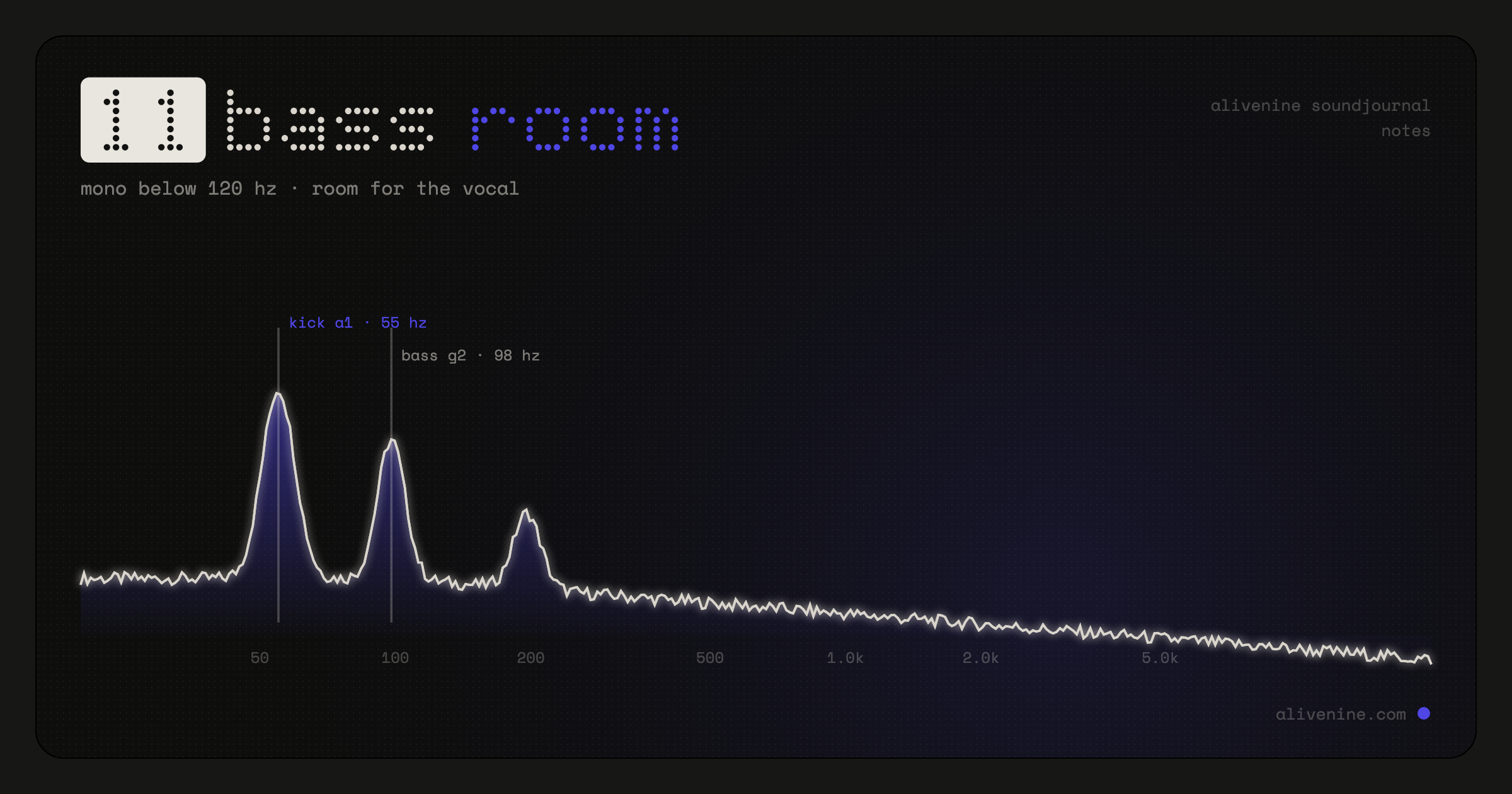
Two sine waves that are close in frequency add up and cancel in turns. The result is a pulse, called beating, as fast as the difference between them. A kick at 55 Hz and a bass at 52 Hz pulse three times a second. On headphones that sounds like a wobble, on a big system the low end seems to come and go.
When kick and bass sit on the same note, they don't beat, they stack. That adds level in one narrow spot and the kick loses its outline. The most comfortable distance is several semitones, or the kick on the root while the bass plays an octave higher.
The classic fix is to duck the bass each time the kick hits, with a compressor on the bass fed by the kick. That helps the level. It doesn't fix the beating in the tail of a long kick, because the bass returns while the kick still rings.
If the bassline moves, look at which bass notes fall on or right after the kick. If the bass sits a semitone away from the kick on one of those notes, you have three options: move that bass note, shorten the kick decay so the tail is gone before the bass comes back, or retune the kick for that part of the song.
how alivedrum does it
alivedrum is a drum synth with no samples. Every hit is built from the wave up, and the kick is tuned from the start. You set a key and a scale, and the kick body lands on a note of that key between 49 and 58 Hz, G1 to A#1. It prefers the root, then the fifth, then the fourth, whichever sits closest to the middle of that range, so it stays deep.
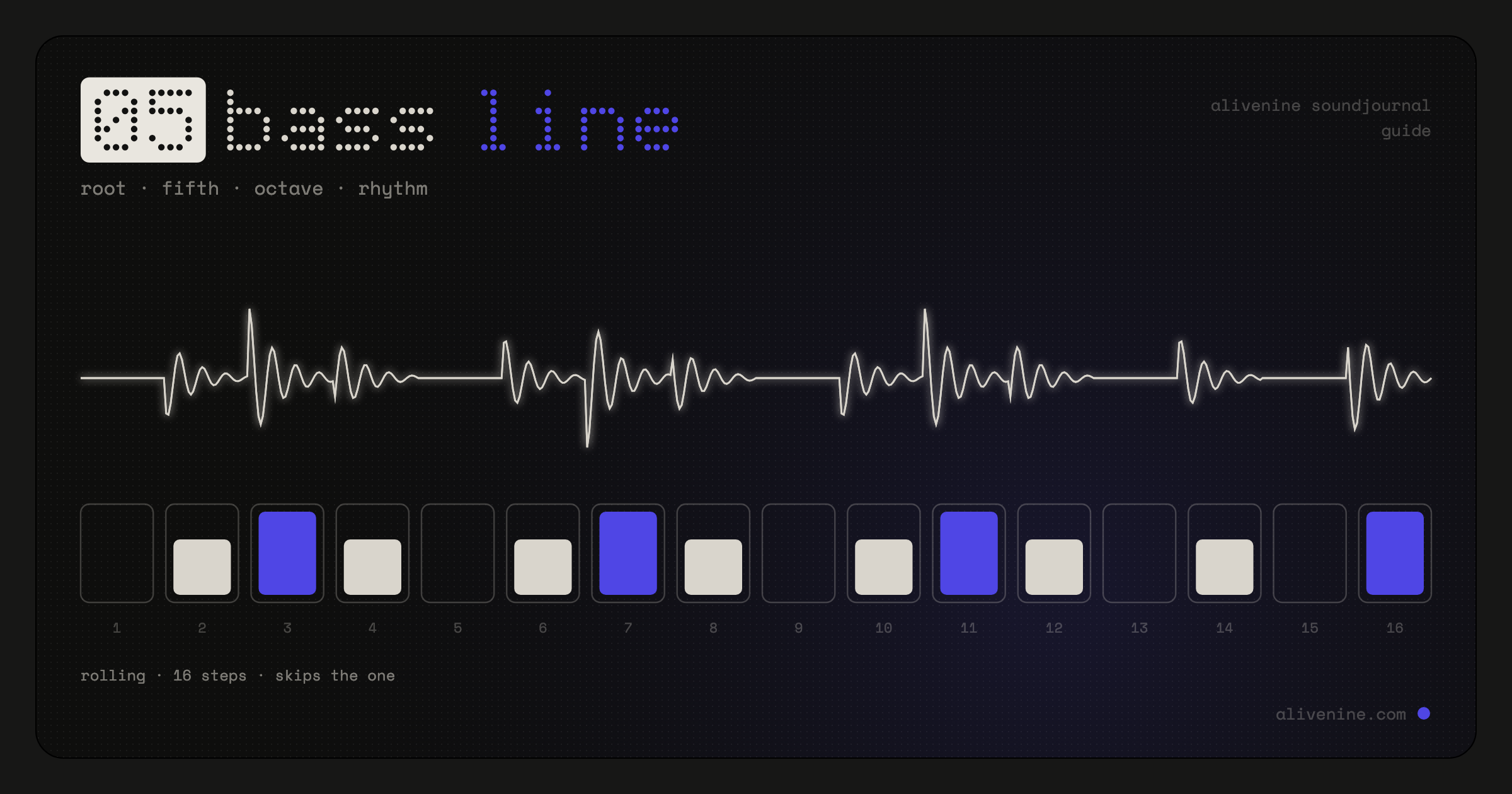
Then there is bass follow. alivedrum listens to your bass, either from MIDI notes on channel 2 or from the bass track on its sidechain input, where it detects the pitch between 28 and 350 Hz. When it knows the bass note, the kick moves to the note of the key in its range that sits furthest from the bass note, counting up to 5 semitones, still with a lean towards the root and the fifth. It waits until the bass note has been stable for 150 ms before it changes, and it holds its note through short gaps in the bassline, so it doesn't jump around on every pause.
The kick is also kept out of the low mids. By design there is almost nothing between 100 and 500 Hz in the kick, which leaves that range to the bass and the snare. The range switch picks between a sub kick from 49 to 58 Hz and a punch kick one step higher, from 58 to 70 Hz, closer to what produced loops sound like.
alivedrum runs as AU, VST3, app and Max for Live device. You can play it in your browser with the real plugin code. In the app and the plugin, the trackpad of your MacBook becomes a drum pad with six zones. If you'd rather keep your samples, everything above works with them too.
listening tips
- Loop four bars of kick and bass alone at a low level. Beating is easier to hear quietly than loudly.
- Listen in mono. Kick and bass are both mono in most mixes, and any clash is clearer there.
- Flip through the song and stop on every bass note change. One wrong note is enough to blur a whole section.
- Check on a phone speaker. A phone plays very little under 200 Hz, so you mostly hear the click and the overtones. If the kick disappears there, it needs more click, not more body.
- For the rest of the low end, see a bass that leaves room for the kick and the vocal.
faq
Should I tune my kick to the key of the song?
Yes, for any kick with an audible body. A tuned kick fits the chords above it and stops beating against the bass. Very short, clicky kicks need it less, because they barely have a note.
What note should a kick drum be tuned to?
The root of the key or its fifth. Pick whichever lands between about 45 and 70 Hz. Avoid notes a semitone away from the root and from the bass notes that play on the kick.
How do I find the pitch of a kick?
Loop the kick and read a tuner or a spectrum after the initial click, when the tail has settled. The tallest low peak is the note. You can also play a sine tone under it and move it until the beating stops.
Why do my kick and bass sound muddy together?
Often because both sit on neighbouring notes in the same low range. The two waves beat against each other at the difference of their frequencies. Tune the kick a few semitones away from the bass notes that play with it, or shorten its decay.
What is a good frequency for a kick drum?
Most kicks put their body between 45 and 80 Hz. Lower sounds deeper and needs a good system, higher is easier to hear on small speakers. The right value is the note of your key that falls in that range.
Does tuning a kick sample change its sound?
A little, and more the further you go. Pitching up shortens the sample and thins the click. A few semitones are usually fine. Beyond that, start from a sample that's closer.
If you want to check the result with numbers, our guide to a free loudness meter for Mac shows what to read. And if the whole beat feels too clean after that, how to make soft synths sound analog is the next step.