· by max
how to tune vocals in logic, ableton and garageband
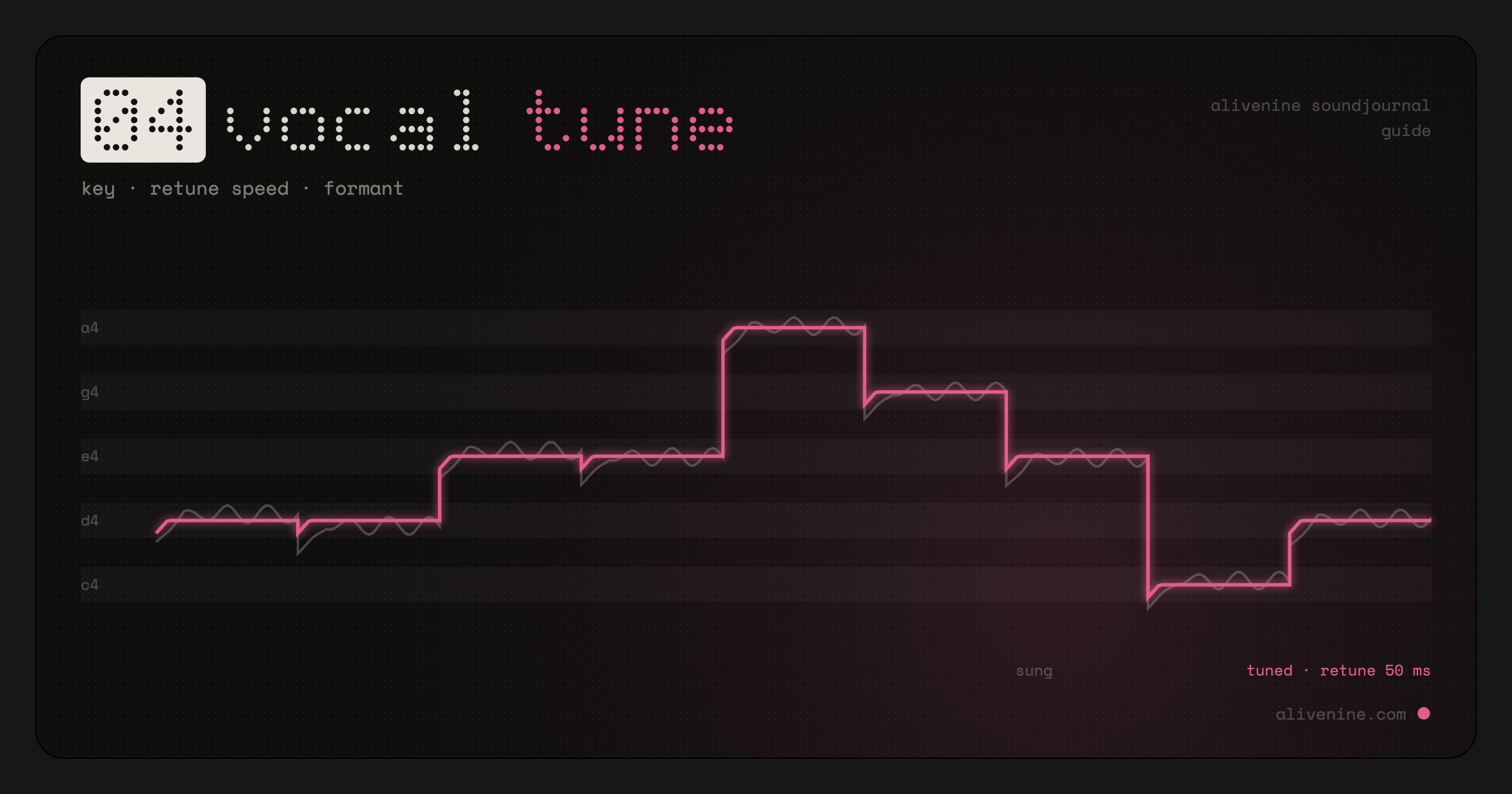
Two settings decide how a tuned vocal sounds: which notes the voice may land on, and how fast it gets there. Below are values for a natural, a pop and a hard robotic sound, and what Logic, Ableton and GarageBand can do out of the box. alivevox, the vocal tuner I built, is one more way.
- set the key and scale first. a tuner in the wrong key pulls every note the wrong way.
- retune speed decides the sound: 0 ms is the hard robotic effect, around 50 ms sounds like modern pop, 200 ms and more sounds natural.
- remove notes from the scale that the melody never sings. fewer targets means fewer wrong jumps.
- tuning while it plays is fast. note editing is precise. most finished vocals use a bit of both.
- tune before compression and effects, and keep formants where they are unless you want a different voice.
how pitch correction works
A tuner listens to the voice and estimates its pitch many times a second. Then it compares that pitch to a list of allowed notes, picks the closest one, and shifts the voice toward it. That, in short, is how pitch correction works.
The sound comes from two things. The list of allowed notes decides where the voice can go. The speed of the shift decides whether you hear the correction or not. A slow shift lets the singer's own movement through. An instant shift snaps every note straight and jumps between them, and that jump is the famous effect.
A good tuner also has to know which part of a note to trust. A singer often scoops into a note from below and adds vibrato on the way out. If the tuner reacts to the scoop, it picks the wrong note. Better tuners judge the note by its centre and ignore the edges.
key and scale come first
Before you touch any speed, set the key. If your song is in A minor and the tuner is set to A major, every C, F and G the singer hits gets pulled a semitone up. On a fast melody, that sounds like the singer is fighting the track.
If you don't know the key, find the root note of the bassline: the note it returns to most often, as in how to make a bassline. Major and minor usually decide themselves once you hear the root against the chords.
remove the notes nobody sings
A scale has seven notes. A typical pop melody uses four or five of them. Take the others out of the tuner. Now a slightly flat note can't land on a neighbour that never belonged to the melody. This one step fixes more audible mistakes than any speed setting.
For the hard robotic sound, this is essential. With all twelve notes allowed, the voice jumps to notes the melody never had.
retune speed: natural, pop or hard
retune speed is the time the tuner takes to pull a note to its target. Most tuners show it in milliseconds. The numbers below are a starting point. A voice with a lot of vibrato needs slower settings than a straight one.
| retune speed | What you hear | Use it for |
|---|---|---|
| 0 ms | The hard effect. Every note is straight, jumps are instant. | Trap, hyperpop, the robotic sound as a style |
| 10 to 30 ms | Tight and polished. A little of the effect on fast passages. | Modern pop, R&B, dense productions |
| Around 50 ms | Clean pop, the correction stays mostly hidden | Lead vocals in most genres |
| 100 to 200 ms | Natural. Only held notes get pulled in. | Ballads, acoustic, backing vocals |
| 200 ms and more | Very gentle. Only clearly sour notes move. | Live takes that are almost there |
Two more controls change how speed behaves. humanize corrects long notes more gently than short ones, so held notes keep their life while fast runs stay tight. flex tune leaves notes alone that are far from the target. The idea is that a big bend or slide was meant, and a small error wasn't.
keep vibrato and slides
Vibrato is a regular swing around the note, in most singers about five to six times a second. In pop it usually moves by a fraction of a semitone, in classical solo singing up to about a semitone either side. A fast retune speed reads that swing as error and flattens it. The vocal suddenly sounds pasted together.
- If vibrato disappears, slow the speed down or raise humanize until it comes back.
- If a slide into a note sounds stepped, raise flex tune, or tune that phrase on its own track with a slower setting.
- If a long note warbles, the tuner might be switching between two targets. Remove the neighbour note from the scale.
Breathy and very low notes are hard to track. Tuners often jump an octave on vocal fry. A setting for the vocal range, soprano, tenor or low male, keeps the search in the right area and stops those jumps.
editing single notes
Live tuning treats every note the same way. Note editing lets you treat each one differently. The vocal shows up as blobs on a piano roll, one blob per note. You drag a blob up or down to change the note, stretch it to change its length, or split it where two notes run together.
This is where a vocal goes from tuned to finished. A few common moves:
- Pull a single sour note into place and leave the rest untouched.
- Shorten a note that runs into the next phrase.
- Move a late entry a few milliseconds earlier.
- Reduce the pitch drift inside a long note without killing its vibrato.
Good editors resynthesize the voice so that pitch and length change separately and the formants stay put. Unedited parts should sound exactly like the recording.
formant and character
Formants are the resonances of the throat and mouth. They make an a sound like an a, and they make one voice sound different from another. When you shift pitch without protecting the formants, the voice gets smaller and thinner going up, and bigger and darker going down.
For normal tuning, keep formants where they are. Use a formant shift only when you want a different character. A few semitones down makes a voice sound bigger and darker. A few up makes it brighter and smaller. On harmony voices that are pitched down, a small formant drop keeps them from sounding like the lead singer an octave lower.
tuning in logic, ableton and garageband
Every big DAW on the Mac can tune a vocal without extra software. What differs is how far it goes.
| DAW | Real time | Note editing |
|---|---|---|
| Logic Pro | Pitch Correction plugin with key, scale and response speed | Flex Pitch in the track editor, blobs per note |
| Ableton Live | Auto Shift, since Live 12.1 in every edition | No blob editor. Transpose and warp per clip, or a plugin |
| GarageBand | Pitch Correction slider in the audio editor, with Limit to Key | None |
Logic Pro: put the Pitch Correction plugin on the vocal for a quick pass, set root and scale, and choose a response time. For detailed work, switch the track to Flex Pitch, open the editor and drag the blobs. Logic analyses the take once, then edits are instant.
Ableton Live: since version 12.1, every edition includes Auto Shift. It corrects a mono signal while it plays, to a scale you pick or to the scale of the project. For single notes there is no blob editor in Live. Many people cut the clip and transpose pieces, or use a plugin with its own editor.
GarageBand: open the audio editor of the vocal track, set the key of the project, turn up the Pitch Correction slider and tick Limit to Key. It's simple, and for demos it's often enough.
If you already have Melodyne or Autotune, they remain the reference for detailed editing and the classic effect. Everything in this guide applies to them too.
alivevox
alivevox is the vocal tuner we built, and it goes further than tuning. It runs as AU, VST3, Max for Live device and as its own Mac app, so you can sing into it without a DAW.
tuning
You pick a vocal range, key and scale. The keys on the screen light up for the allowed notes, and a click removes a note from the scale. retune speed goes from 0 to 400 ms. 0 is hard, about 50 is pop, 200 and more is natural. humanize and flex tune work as described above. The alive mode is the hard lock, on by default: it judges each note by its centre, so vibrato and scoops don't tip it to the wrong note, and it holds through breathy parts. formant shifts the colour by up to six semitones without changing the pitch, and the reference pitch can sit anywhere from 430 to 450 Hz.
editing
An edit view puts the sung take on a note grid. In Ableton or Logic, you capture a passage by playing it back once. Then you click a note to hear it, drag it to a new pitch that snaps to the key, stretch it, split it or join it with the next. One click moves everything into the key. Another writes a new melody from your take: the rhythm and direction stay, long notes and phrase ends land on chord tones, and every click gives a different line.
beyond tuning
vibe opens only the notes of one chord, so any melody you sing lands on chord tones. The doubler adds two takes hard left and right, each slightly detuned and late. harmony stacks up to four voices, from scale intervals or from the MIDI notes you hold, and the choir mode sings the chord under your melody. There is a vocoder too, with your tuned voice shaping a synth. You can try alivevox in the browser with the real plugin code.
listening tips
- Listen to the vocal with the music, not solo. A slightly loose vocal often sounds right in context and tuned too hard alone.
- Check the held notes. That's where too fast a retune speed shows first.
- Listen to the transitions between words. A jump that sounds clean on vowels can crack on an s or a breath.
- Bypass the tuner for a whole chorus once. If the untuned version has more feeling, slow the tuner down.
- Tune the lead before you record harmonies against it, so the harmonies match what the listener hears.
faq
How do I tune vocals in Logic Pro?
For a quick pass, insert the Pitch Correction plugin, set the key and scale, and choose a response time. For single notes, enable Flex Pitch on the track, open the editor, and drag each note blob to its pitch.
Can Ableton tune vocals?
Yes. Since Live 12.1, every edition includes Auto Shift, a pitch correction device that works while the track plays, with key, scale and retune control. For editing single notes, you need to cut and transpose clips or use a plugin with a note editor.
What retune speed sounds natural?
Around 100 to 200 ms keeps a natural sound. About 50 ms is a clean pop setting, and 0 ms gives the hard robotic effect.
How do I get the robotic autotune effect?
Set the retune speed to 0, set the exact key, and remove every note the melody doesn't use. Turn humanize and flex tune off. The effect is strongest on a melody with clear jumps between notes.
Should I tune vocals before or after compression?
Before. A tuner reads pitch more reliably from the dry voice, and compression and effects after it then work on the corrected take.
Does pitch correction change the sound of the voice?
A little at fast settings, which is often the point. Good tuners keep the formants in place, so the voice keeps its character. Shifting formants on purpose makes it sound bigger or smaller.
Open alivevox in the browser and sing into it. And once the vocal sits, give it room in the low mids with a bass that leaves space for the voice.